

In today’s fast-paced world, optimizing workflows is key to success for virtual assistants, small business owners, and organizations alike. It’s not just about organizing your tasks and processes; it’s about creating a system that helps you work efficiently, adapt to change, and achieve common goals with your colleagues, clients, or providers. In the remote and collaborative world, where your interlocutors are often only available online, a well-optimized workflow becomes the ultimate competitive advantage that ensures everyone is aligned, informed, and working towards shared objectives.
This blog post explores tools and techniques that can help you optimize your workflow, providing valuable insights and strategies for streamlining operations. Join me as we discover the transformative impact of implementing a well-designed workflow to help your business thrive!

1. Task Management Tool
Efficient task management is essential to any successful workflow.
Task management is particularly crucial for virtual assistants and small business owners, as they naturally handle a variety of tasks, need to allocate resources efficiently, and must adapt to changing work situations.
Having a powerful task management solution can significantly enhance your efficiency and productivity.
It provides a central platform for prioritization, organization, and teamwork, assisting both you and your collaborators in managing a variety of tasks.
It plays a vital role in ensuring customer satisfaction by enabling timely responses to customer needs. Additionally, it facilitates remote work by offering clarity on responsibilities and deadlines. Furthermore, it guarantees organized workflows, minimizes delays, and optimizes resource allocation, ultimately enhancing overall productivity.
Ultimately, efficient task management is not only practical but also strategically necessary for you, as it directly influences the growth and success of your business.
Using task management solutions becomes a strategic advantage in the world of virtual assistance and small business operations, where time and resources are frequently limited. This improves overall effectiveness and fosters long-term success.
Personally, I use Trello for its user-friendly interface, visual boards, and card-based organization, which provide a seamless experience for managing tasks. Trello offers visual organization through boards and lists, making it easy to understand project status at a glance. You can effortlessly drag lists, sort, filter, or automate actions for efficient project management. The platform fosters collaboration with features like comments and attachments, which are crucial for remote teams.
In essence, Trello brings simplicity, adaptability, and collaborative functionality to enhance productivity and make task management a fun experience.
“There’s a way to do it better – find it”.
Thomas Edison

2. Communication Platform
Effective communication is the cornerstone of collaborative work.
It’s not just about sharing information; it is about making sure that everyone understands tasks and works together toward common goals.
Clear communication helps overcome challenges and facilitates quick problem-solving. In dynamic projects and fast-paced environments, adaptability is crucial, and effective communication ensures everyone stays updated, making it easier to handle changes.
Having a communication tool is vital for efficient collaboration, clarity in tasks, quick decision-making, and seamless remote work.
To communicate with others when working on collaborative projects, I use Slack, a business messaging tool. Apart from the traditional direct message function, I like its channel-based organization that ensures focused discussions among team members. Slack interacts with key apps like Google Drive and Trello, makes file sharing simple, and has slackbots that can send automated messages and reminders.
In short, Slack provides a dynamic and organized communication hub that enhances collaboration within teams.
For video conferencing, I use Google Meet. As a component of Google Workspace, it easily interfaces with other Google products (such as Gmail, Google Calendar, and Google Drive), which improves scheduling and productivity. The screen sharing and chat features are really helpful for facilitating collaborative discussions, presenting ideas, and maintaining real-time communication during virtual meetings.
In summary, Google Meet is an excellent communication platform, not only for conducting meetings but also for facilitating real-time collaboration with clarity and efficiency.
“If you have always done it that way, it is probably wrong”.
Charles Kettering

3. Time-Tracking Software
Time management is a critical aspect of any business.
It ensures that tasks are completed efficiently and deadlines are met by prioritizing and organizing workloads.
It helps in optimal resource utilization by scheduling tasks based on resource availability, ensuring that manpower, equipment, and other resources are used efficiently.
For virtual assistants, effective time management ensures client satisfaction by allowing them to allocate their time wisely, meet deadlines and budgets, and quickly respond to client needs.
Effective time management can also help small business owners prioritize tasks, allocate resources efficiently, and focus on crucial aspects of business growth and development.
In essence, a time management tool enhances efficiency and effectiveness by preventing time-wasting, ensuring timely task completion, and providing real-time visibility into tasks, priorities, and deadlines.
I use Clockify, a free time-tracking tool that provides a user-friendly interface for tracking work hours.
Time tracking is super easy, either by using a stopwatch or entering hours manually. Its project-based tracking structure enables you to set budgets or generate invoices. You can also create templates to quickly populate a timesheet with your most common activities or copy activities and times from a previous timesheet.
It also has a wide range of reporting features, like a time or budget estimate for a project and a weekly report. It has integrations with a lot of different apps. I particularly like the integration with Google Calendar that allows me to track time spent on meetings or appointments. With Trello integration, I can track the time spent on each task.
In summary, Clockify offers a complete time-tracking solution that is easy to learn and customize. The integration with all your different apps allows you to track time from anywhere on the web with one click.
“Change before you have to”.
Jack Welch

4. Document collaboration platform
Seamless collaboration on documents is the foundation of streamlined workflows.
Collaborative document tools are platforms that facilitate real-time teamwork on shared documents.
They provide a centralized space for team members to communicate, discuss, and collaborate in real-time. These tools provide version control, ensuring that everyone is working on the latest document version, thus reducing errors and confusion. With features such as comment threads and task assignment, they simplify task management and collaboration on different aspects of a document. Finally, their cloud-based nature ensures that team members can access and work on documents from any location.
As such, leveraging collaborative document tools can significantly streamline workflows, improve communication, and optimize document-related tasks.
Personally, I am a big fan of Google Workspace, which stands out as the most user-friendly and collaborative platform for me. It provides a seamlessly integrated environment for teams to work on shared documents in real-time.
Google Workspace offers tools such as Google Docs, Sheets, and Slides, enabling simultaneous editing and fostering a real-time collaborative experience.
Particularly effective for collaborative work is the ‘Shared with Me‘ folder in Google Drive. This folder contains files and folders that others have shared with you, offering a centralized location for accessing shared files on your Google Drive account. Changes made to the files by the owner or collaborators are instantly reflected in the ‘Shared with Me’ section, promoting real-time updates.
In summary, with Google Workspace’s cloud-based nature, document management becomes a streamlined and efficient process.
“Don’t look for the big, quick improvement. Seek the small improvement one day at a time. That’s the only way it happens – when it happens, it lasts”.
John Wooden

5. Streamlining and automation tools
Streamlining tasks involves prioritization, process standardization, and automation.
Tools and techniques for task streamlining are vital for virtual assistants and small business owners.
They boost efficiency because they eliminate unnecessary steps, automate repetitive processes, and provide a more organized workflow.
By automating routine tasks and allocating resources more effectively, these tools help save time and ensure that resources are utilized optimally.
Streamlined processes are inherently more flexible. When tasks are well organized and efficiently managed, it is easier to adjust workflows and implement changes smoothly, minimizing disruptions and maintaining operational effectiveness.
Finally, efficient and organized workflows contribute to timely and high-quality service delivery, enhancing client satisfaction. Streamlining tasks reduces the likelihood of errors by introducing standardized processes and automation.
In essence, these tools play a crucial role in achieving operational excellence, improving client satisfaction, and supporting business growth.
1. I recommend starting with the Eisenhower Matrix, a powerful prioritization method.
It categorizes tasks into four quadrants based on urgency and importance.
Tasks are classified as urgent and important (to be done immediately), important but not urgent (scheduled), urgent but not important (delegated), or neither urgent nor important (eliminated or postponed).
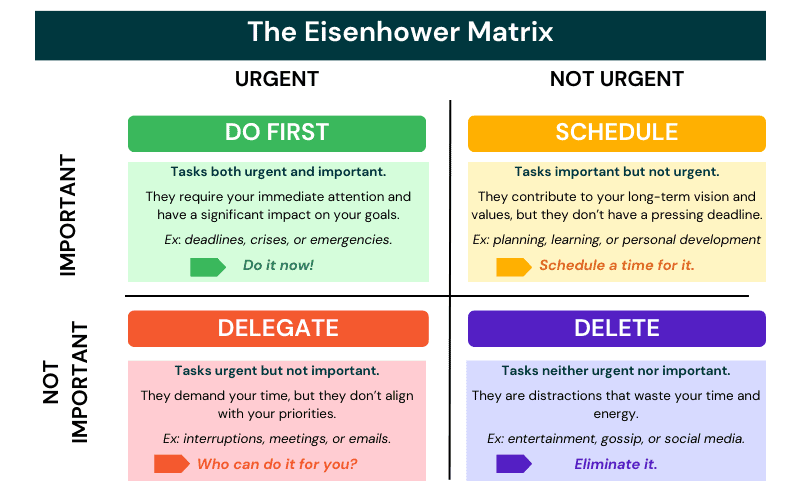
This method is a great support in task prioritization and strategic decision-making, enabling you to focus on high-impact activities, optimize time allocation, and facilitate effective task delegation.
2. Implementing Standard Operating Procedures (SOPs) is a key technique for task streamlining.
A SOP is a documented set of step-by-step instructions or guidelines that outline how a particular task or process is to be executed.
They ensure consistency in operations, reducing variations in task execution. They lead to increased efficiency, as tasks are performed in a structured and systematic manner. They can also support training and onboarding processes, helping new team members quickly grasp and adhere to standardized procedures.
Periodically reviewing and updating SOPs to incorporate improvements contributes to ongoing process optimization.
In essence, SOPs provide a structured framework that enhances overall operational effectiveness and supports continuous improvement.
3. Automation tools like Zapier help streamline tasks by automating repetitive processes.
Zapier is a versatile platform that automates tasks between different apps, saving time and reducing manual effort.
Basically, when an event happens in application A, it triggers an automatic action in application B.
It is very easy to set up; you can create automations without the need for advanced coding skills. It is also very versatile (there are over 2000 automations available)! For example, you can use Zapier to automatically create a Trello card when a new row is added to a Google Sheet.
By automating tasks and integrating apps, Zapier significantly enhances efficiency, productivity, and the overall effectiveness of your business processes.
“Practice the philosophy of continuous improvement. Get a little bit better every single day”.
Brian Tracy

Conclusion
Embracing these tools and techniques has the potential to significantly enhance your business. Adopting a holistic approach empowers you not only to manage tasks but also to build a solid foundation for success in the fast-changing digital landscape.
Embrace these strategies and witness their transformative impact on sustained growth and productivity!
“Every success story is a tale of constant adaption, revision, and change”.
Richard Branson
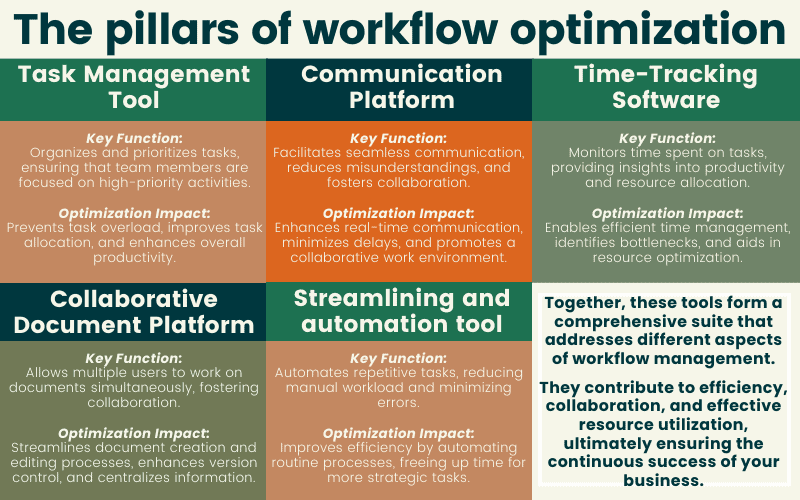
Prefer a visual? Explore the key points in this SlideShare presentation:
Ready to delegate? Explore the unique value I add to your business!
Click here to learn more about my services and how I can bring a holistic approach to your work.
 Cath Assist Service